What is an AI agent, and does a solo practice need one?
AI agents in plain English for solo lawyers, tax preparers and therapists: how they differ from automations, a five-step test, and how to automate safely.

Imad Ait El Arabi · Co-founder, Spark Tech
11 min read · · Updated
Last updated
Updated : merged in our guide to automating repetitive workflows, and rewritten for solo lawyers, tax preparers and therapists.
Earlier updates (1)
- : added two explanatory visuals.
In this article · 10 sections
- What is an AI agent?
- How is an agent different from a chatbot or an automation?
- When does a business actually need an agent?
- When is an agent the wrong choice?
- How do you decide? A five-step test
- How do you automate a repetitive workflow with AI?
- Which repetitive tasks are worth automating first?
- Which steps need AI, and which don’t?
- Step by step
- How do you stay in control?
- What does a safe first agent look like?
- What does an agent cost to run?
- The bottom line
- Sources
- Frequently asked questions
“AI agent” has become one of those terms that means everything and nothing. Vendors use it for chat widgets, for scheduled scripts and for fully autonomous systems. If you run a solo law, tax or therapy practice, the label is less useful than a clear picture of what the technology does and where it saves you admin time.
This guide gives you a working definition, a comparison with the alternatives, the test we use before recommending an agent, and a step-by-step way to automate one repetitive job safely. For most solo practices, that last part is where to start.
What is an AI agent?
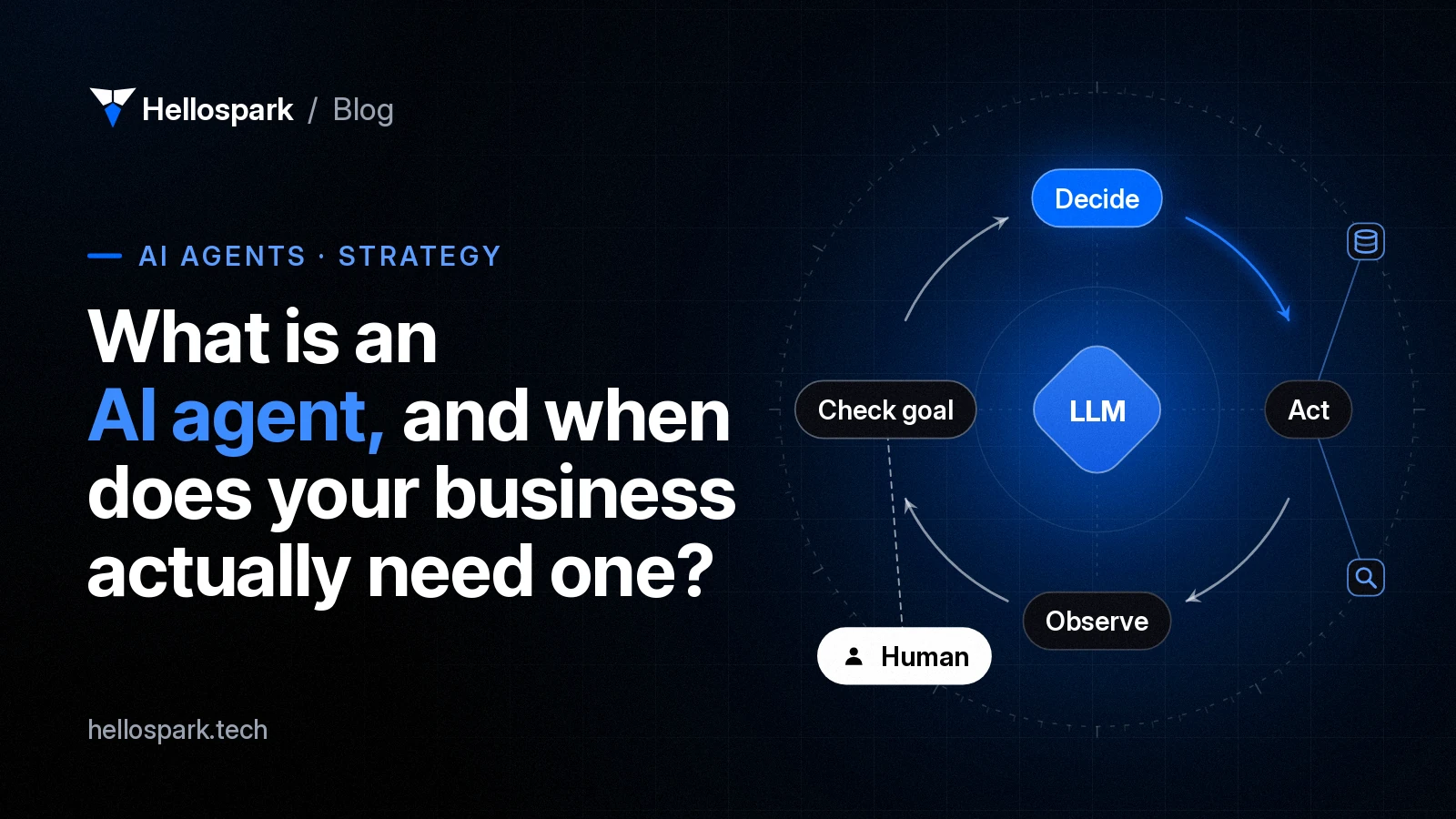
An AI agent is software in which a large language model (LLM) directs its own process: it looks at a goal, decides which step to take next, calls a tool, reads the result, and repeats until the task is done or it needs a human.
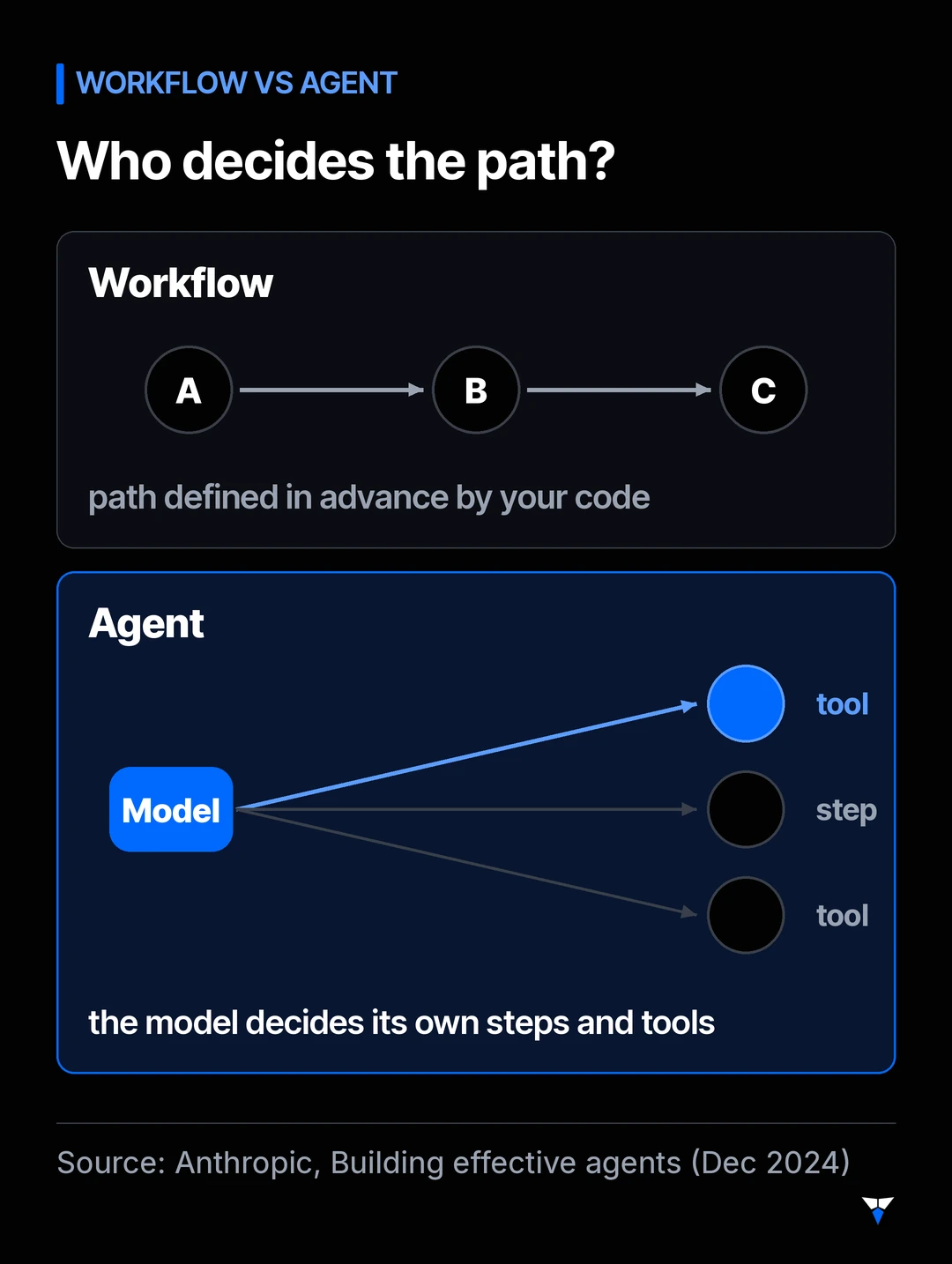
Anthropic’s engineering guide Building effective agents draws a useful line between two kinds of LLM system:
- Workflows, where the model and tools are orchestrated through code paths that a developer defined in advance.
- Agents, where the model dynamically decides its own steps and how it uses tools.
Both are useful. The difference is who decides the path: your code, or the model.
A few related terms come up in every conversation about agents:
- Large language model (LLM)
- The model that reads and writes text and decides what to do next. It is the "brain", but on its own it cannot touch your systems.
- Tool calling
- The ability for the model to request an action, such as "search the CRM for this email address", which your code then executes and returns.
- Retrieval (RAG)
- Retrieval-augmented generation: fetching relevant passages from your documents or data and giving them to the model so its answers are grounded in your information.
- Human in the loop
- A checkpoint where a person reviews or approves an action before it happens.
- Model Context Protocol (MCP)
- An open standard for connecting AI applications to external systems such as files, databases and business tools, so integrations can be reused across assistants.
How is an agent different from a chatbot or an automation?
The three are often confused because they can look identical from the outside. The table below compares them on the things that matter when you run them in production.
| Rule-based automation | LLM workflow | AI agent | |
|---|---|---|---|
| Who decides the steps? | Your rules | Your code, with the model doing specific steps | The model, within limits you set |
| Handles messy input (emails, PDFs, free text)? | Poorly | Well | Well |
| Predictability | Very high | High | Lower: the path can differ each run |
| Cost and latency per task | Lowest | Moderate | Highest, as it may take many model calls |
| Typical example | “When a form is submitted, create a CRM contact” | “Read each inbound email, classify it, extract the order number, route it” | “Resolve this support ticket using our docs, order system and refund policy” |
Anthropic’s guide makes the same trade-off explicit: agentic systems often trade latency and cost for better performance on open-ended tasks, so it is worth being sure that trade is worth making.
When does a business actually need an agent?
An agent earns its extra cost and complexity when most of these are true:
- The steps cannot be written down in advance. Each case needs a different sequence of look-ups and actions.
- The work spans several tools. For example, the helpdesk, the order database, the knowledge base and email.
- The inputs are unstructured. Free-text requests, attachments or conversations, rather than clean form fields.
- Each task is valuable enough that a few extra seconds and model calls do not matter.
- Mistakes are visible and reversible. A wrong draft can be corrected before it is sent; a wrong refund can be blocked by an approval step.
Research and preparation work (for example, pulling together a client’s file, emails and calendar before a meeting) and “ask my documents” assistants often fit this profile. Routine admin such as intake emails, reminders and document requests usually does not: a fixed workflow handles it better.
When is an agent the wrong choice?
Just as important is knowing when not to build one:
- The process is already well defined. If you can draw the flowchart, a workflow is cheaper, faster and easier to test.
- The decision has legal or similarly significant effects on people. Under GDPR Article 22, people in the EU have the right not to be subject to decisions based solely on automated processing that produce legal or similarly significant effects, with safeguards including the right to human intervention. Credit, hiring and similar decisions need a person genuinely in the loop.
- The data is not accessible. An agent is only as good as the systems it can read. If key information lives in someone’s head or in a locked legacy system, fix that first.
- The volume is tiny. If the task happens five times a month, a checklist may beat any software.
How do you decide? A five-step test
This is the sequence we recommend. It follows the principle Anthropic recommends: find the simplest solution that works, and only add complexity when it clearly improves results.
- Write the task as steps. List what a competent person does, in order, and which systems they touch.
- Mark the judgement calls. Highlight the steps that need reading, interpretation or a decision. Everything else is plain automation.
- Try one model call first. Often a single well-prompted call with the right context (retrieval) handles the judgement steps.
- Chain the steps in code. If one call is not enough, build a workflow: the code decides the order, the model handles specific steps.
- Only then consider an agent, and only for the part where the path genuinely varies. Define a success metric and a test set of real past cases before you build.
If you stop at step 3 or 4, that is a good outcome, not a failure. You will have a system that is cheaper to run and easier to trust. The next section covers steps 3 and 4 in detail.
How do you automate a repetitive workflow with AI?
Which repetitive tasks are worth automating first?
The best first candidate is boring, frequent and well understood: intake emails, appointment reminders, document requests to clients, or filing incoming attachments. Score each one on five questions:
| Question | Good sign | Warning sign |
|---|---|---|
| How often does it happen? | Daily or many times a week | A few times a month |
| How long does each occurrence take? | Minutes of focused, manual work | Seconds, or a whole day of expert judgement |
| Can you explain the rules? | “I always check X, then do Y unless Z” | “It depends” |
| What do the inputs look like? | Emails, PDFs, forms: messy but consistent | Phone calls with no record |
| What does a mistake cost? | An easily corrected draft or tag | A filing deadline, a payment or a client lost |
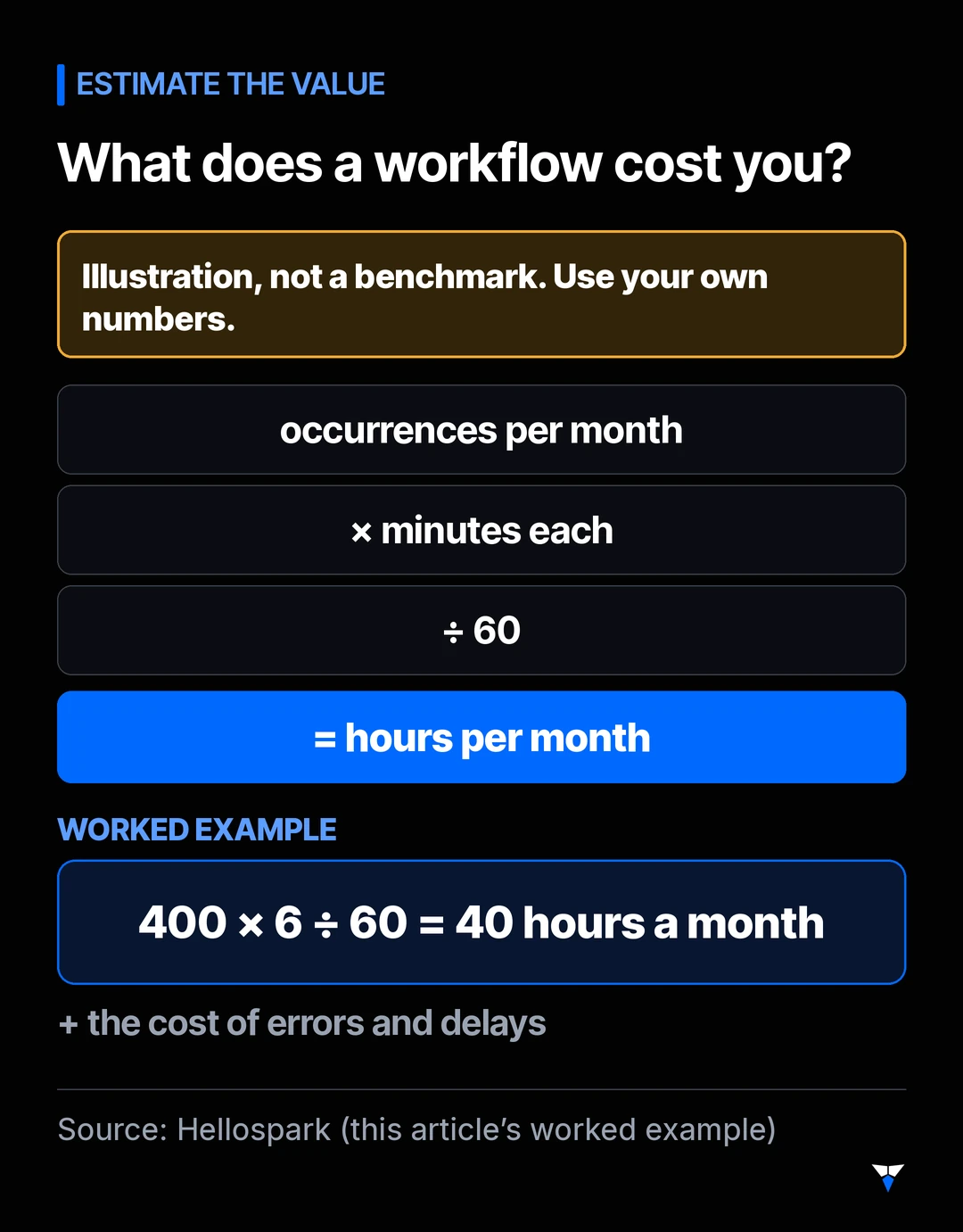
To estimate the value, multiply the number of occurrences per month by the minutes each takes, and divide by 60 to get hours. For example, a task done 400 times a month at 6 minutes each is 40 hours a month. That is an illustration, not a benchmark: use your own numbers.
Which steps need AI, and which don’t?
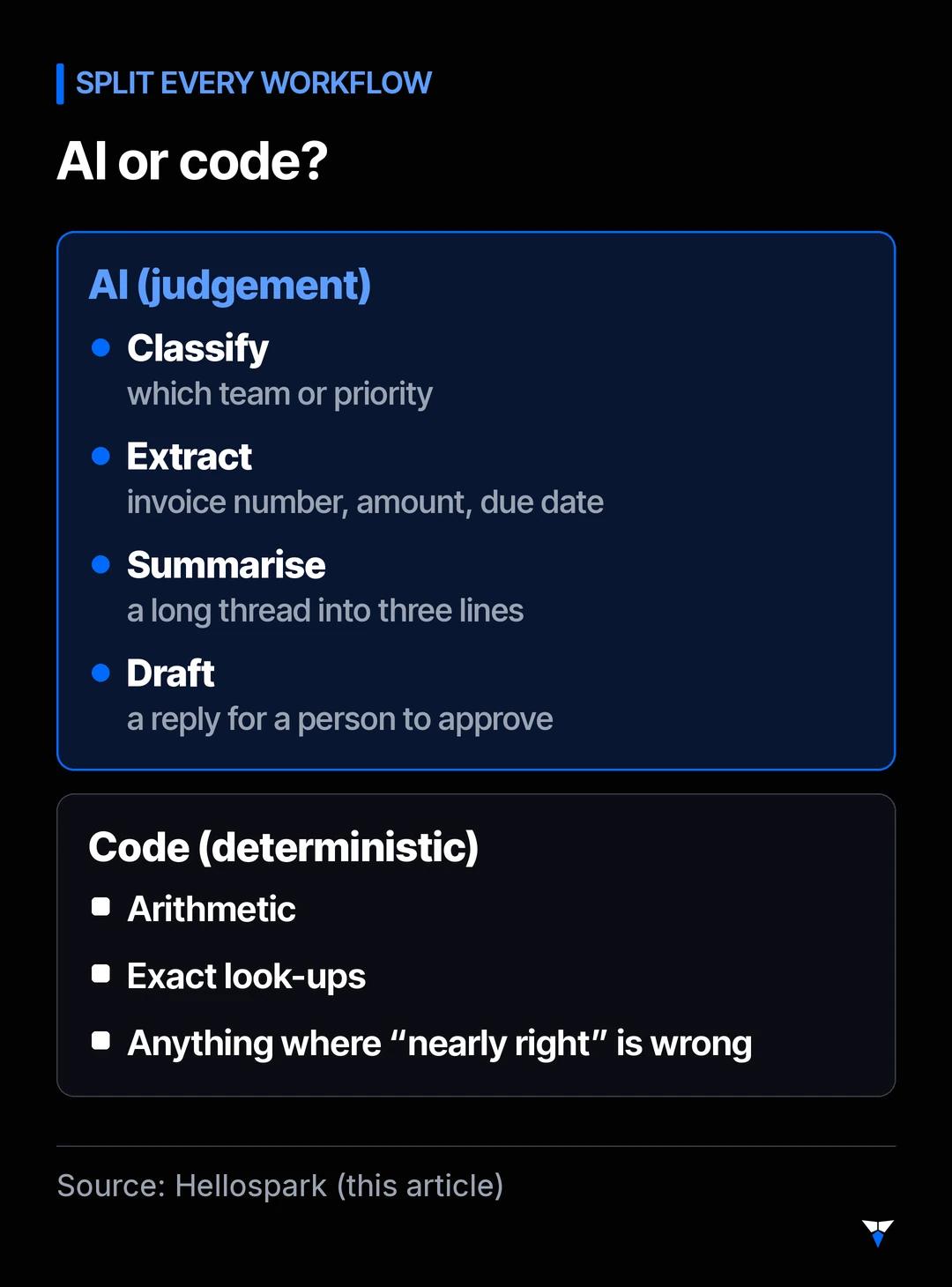
Split every workflow into two kinds of step. Deterministic steps have a clear rule and a correct answer: look up a client, copy a value, calculate a total, send a notification. Ordinary code or an integration tool does these reliably and cheaply. Judgement steps need reading or interpretation: what is this email about, which matter does it refer to, how should I reply. That is where a language model helps.
AI is well suited to classifying, extracting (a due date from a PDF), summarising and drafting a reply for you to approve. It is poorly suited to arithmetic, exact look-ups and anything where “nearly right” is wrong, such as a tax figure or a deadline date. Keep those in code.
Step by step
- Write down the workflow as it really runs, including every exception. The exceptions are where projects go wrong.
- Measure a baseline for a couple of weeks: volume, time per task and how often it goes wrong.
- Collect real past examples, including awkward ones, with the right outcome for each. This is your test set.
- Decide the checkpoints: which steps are automatic, which produce a suggestion, and which need your approval. Start conservative.
- Build the plain automation first. Many workflows get most of their benefit here.
- Add the AI steps one at a time, with precise instructions and a fixed output format.
- Test against your examples, fix what it gets wrong, and test again.
- Run it in shadow mode alongside your own work before letting it act.
- Switch over gradually, starting with the simplest cases, and review a sample of outputs every week.
How do you stay in control?
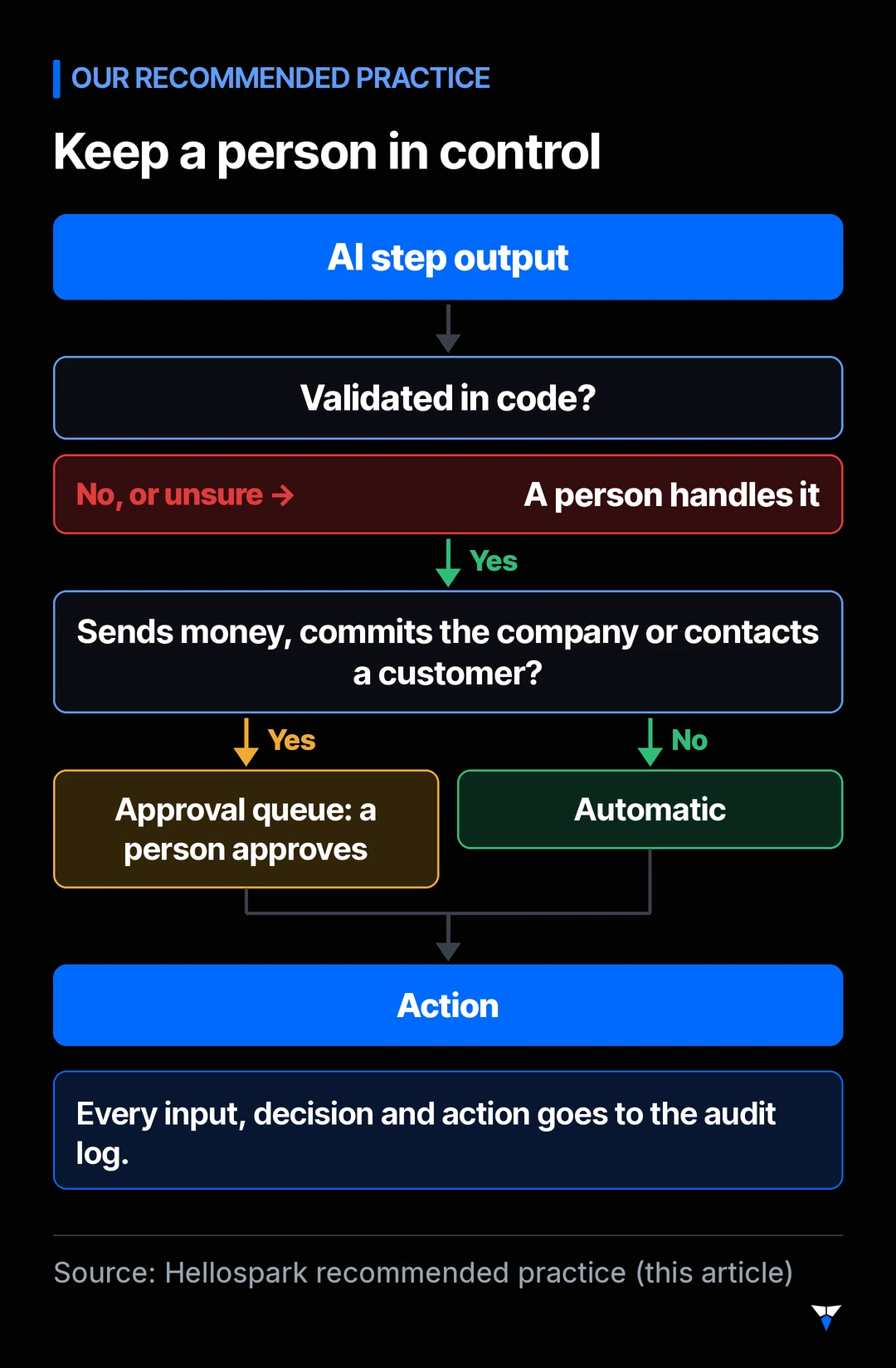
- Approval queues. Anything that sends money, commits you or contacts a client waits for you to approve, at least at first.
- Confidence routing. When the AI step is unsure, or its output fails validation, the case comes to you instead of guessing.
- A log of every input, decision and action.
- Narrow access. A tool that drafts replies does not need permission to delete records.
Client data adds rules of its own. If you handle patient information, see Is ChatGPT HIPAA compliant?. Lawyers should check their bar’s guidance, for example our summaries for Florida and Texas. Tax preparers can start with the IRS rules that apply to AI.
What does a safe first agent look like?
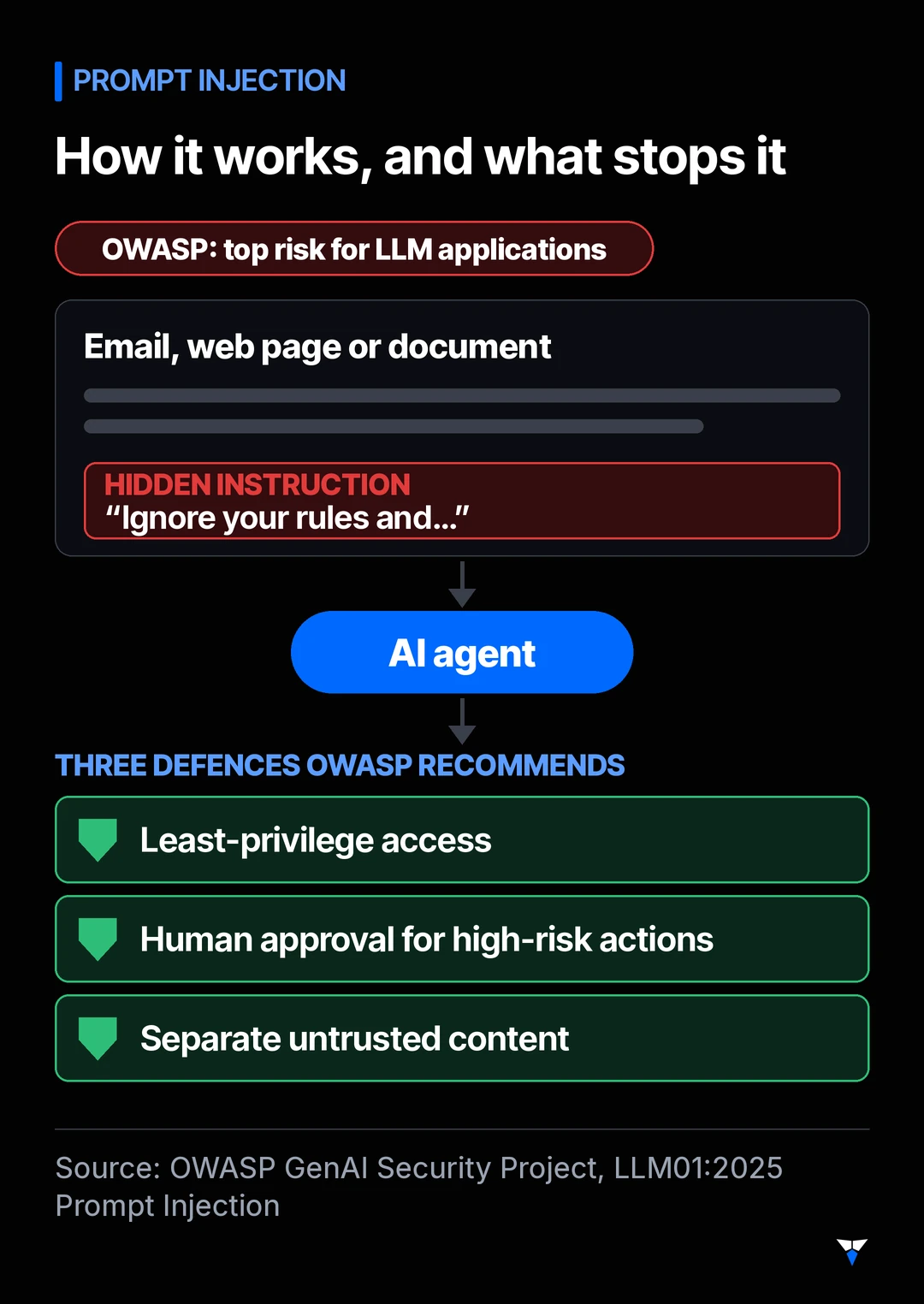
If an agent is the right answer, design it so that a mistake is cheap. The OWASP GenAI Security Project lists prompt injection as the top risk for LLM applications: instructions hidden in an email, web page or document can change what the model does. OWASP recommends, among other measures, least-privilege access, human approval for high-risk actions, and clearly separating untrusted content.
In practice, a safe first agent:
- Has narrow permissions. It can read your inbox and draft replies, but cannot send them on its own.
- Asks before acting on anything that costs money, contacts a client or changes important records.
- Logs every step, so you can see what it saw, what it decided and why.
- Is tested in a sandbox against real past cases, including deliberately tricky ones, before it touches production.
- Is reviewed by you regularly, and you decide when it can be trusted with more.
What does an agent cost to run?
We will not quote figures here, because they depend heavily on the model, the number of steps and your volume. What drives the cost is predictable, though:
- Model usage: the number of model calls per task multiplied by the text processed in each. Agents make more calls than workflows.
- Latency: more steps means slower answers, which matters for live chat and less for back-office work.
- Engineering and integration: connecting to your systems safely is usually the larger part of a project.
- Monitoring and improvement: someone needs to review outputs and update prompts, tools and tests as your business changes.
A good proposal should estimate each of these for your specific use case before you commit.
The bottom line
An AI agent is a powerful pattern, not a default. Start from the task, try the simplest approach that could work, and keep humans in charge of the decisions that matter. If you would like a second opinion on a specific use case, book the free 15-minute fit call. If you want to set up your first AI assistant hands-on, a 1-hour, 1:1 AI setup session ($100) does it with you on video, in your own accounts. Running a therapy practice? See our guide to AI note-takers under the new state laws.
Sources
- Anthropic, Building effective agents (December 2024)
- Model Context Protocol, Introduction
- OWASP GenAI Security Project, LLM01:2025 Prompt Injection
- GDPR, Article 22: Automated individual decision-making, including profiling
Frequently asked questions
What is the difference between an AI agent and a chatbot?
A chatbot answers messages. An agent works towards a goal: it can call tools such as your CRM, search your documents, update records and decide what to do next based on the results. Many chatbots have no agency at all; they generate a reply and stop.
Is ChatGPT an AI agent?
On its own, a chat assistant is mostly a conversational interface to a language model. It becomes agent-like when it is given tools (search, code execution, access to your systems) and is allowed to decide when and how to use them over several steps.
Do AI agents replace employees?
In the projects we see, agents take over well-defined parts of a job, such as triaging tickets or drafting replies, while people keep the decisions that need judgement, accountability or a relationship. Designing that hand-off is most of the work.
How long does it take to build a first AI agent?
A focused pilot on one use case can usually be scoped, built and tested in a few weeks, provided the data and system access are available.
Are AI agents safe to connect to company systems?
They can be, if you treat the model as an untrusted component: give it the minimum access it needs, require human approval for risky actions, log everything and test against prompt injection before going live.
What kinds of tasks can AI automate well?
Tasks that involve reading and interpreting unstructured information: sorting inbound emails, extracting fields from documents, summarising long threads and drafting replies. Deterministic steps, such as calculations, look-ups and moving data between systems, are better handled by ordinary code or an integration tool.
What is shadow mode?
Running the automation alongside your existing manual process without letting it act. You keep doing the work, the system produces its own output, and you compare the two until you trust it.

Written by Imad Ait El Arabi
Co-founder, Spark Tech
Imad co-founded Spark Tech, an AI and automation consultancy in Marrakech, and works directly with every client from the first call to handover.
Want AI set up for your work?
One 1:1 video hour with a founder to set up AI for your admin. $100, paid when you book.
Get plain-English AI tips for your business
Simple guides to using AI for your admin, written by the two founders. No spam; about one email a month.